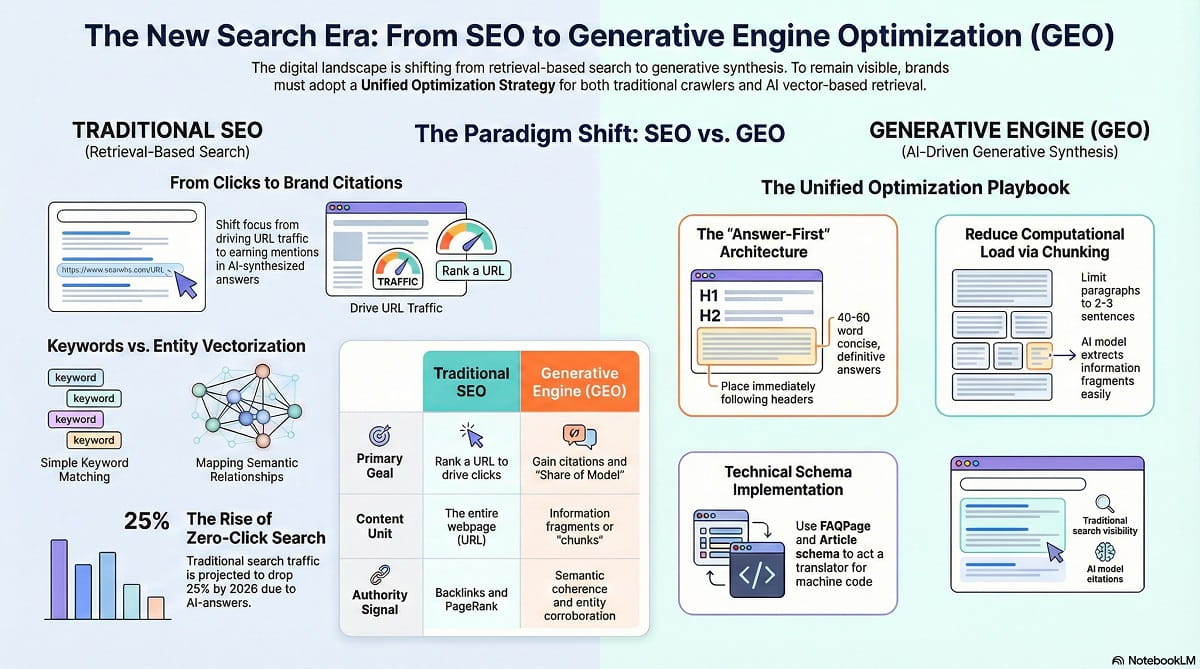
As a professional content writer, I’ve watched the landscape shift dramatically. We used to write just for humans and “spiders” (Google’s crawlers), but now we have a third audience: The Robots (AI Models).
If you want your content to rank on Google (SEO) and get cited by ChatGPT or Gemini (GEO), you can’t just “keyword stuff” anymore. You need a hybrid strategy.
Here is my step-by-step guide on how to write a dual-optimized article and exactly how to build it in WordPress.
The Setup (The Answer-First Mindset)
Before we even open WordPress, we need to change how we outline.
In the past, we used “hooks” or long intros to draw readers in. AI hates that. It calls it “noise” because it takes too much computing power to sift through.
To win at GEO, we use an inverted pyramid structure.
1. The Zero-Position Chunk (Your Intro)
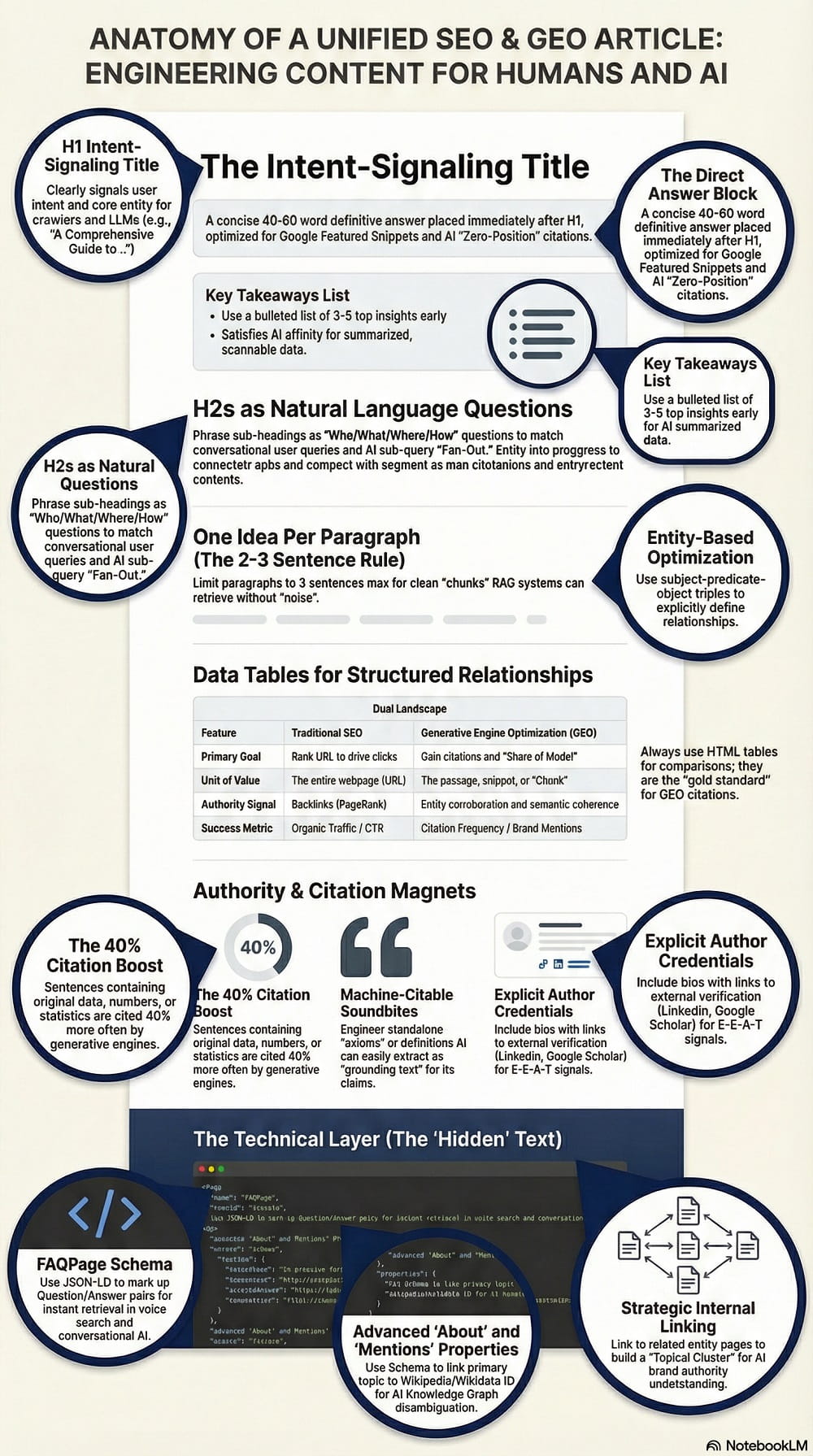
Immediately after your H1 Title, write a Direct Answer Block.
What it is: A 40–60 word definitive summary of the answer.
Why: This helps you win Google’s “featured snippet” (SEO) and serves as a perfect soundbite for AI to grab (GEO).
2. H2s as Questions
Don’t write vague headers like “benefits.”
Do this: Write natural language questions like “What are the benefits of [Topic]?”
The golden rule: The very first sentence after that header must answer the question directly. No fluff!
Adapt the 5W + 1H formula: What, where, when, why, who, how.
Writing the Content (The Engineering)
Now, let’s write. We are moving from “strings” (keywords) to “things” (Entities).
1. Create Vector Clouds (Not Keyword Stuffing)
Old SEO meant repeating “best coffee maker” 10 times. GEO requires semantic variance.
How to do it: If you are writing about “Apple” (the tech company), don’t just repeat “Apple.” Intentionally use related words like “iPhone,” “MacBook,” “Cupertino,” and “technology”. This creates a “vector cloud” that locks your content into the right category for the AI.
Most of the time you don’t need to do this task, because with natural writing you should include semantic variance naturally, and AI now is smart enough to understand the context.
2. The “No Fluff” Policy
AI penalizes low-information text.
Bad: “In today’s fast-paced digital world, it is important to consider…”
Good: “Digital marketing ROI increased by 15% in 2024.”
Why: Specific stats and definitions are cited 40% more often than generic text.
Pro tip: use Perplexity to find reliable sources for consolidating the statistic.
3. Chunking
Keep your paragraphs short, 2 to 3 sentences max. This helps RAG systems (the tech behind AI search) pull out clean “chunks” of info without breaking the context.
Practical Application on WordPress (Step-by-Step)
Okay, let’s open up the WordPress Editor (Gutenberg) and build this.
1. The H1 and The “Direct Answer”
Type your title (H1).
In the very first paragraph block, type your 40-60 word definition. Bold the most important entities. This is your direct answer block.
2. The Power of Lists
AI loves structure. Never use comma-separated lists in a paragraph.
Instead, use the list block (<ul> or <ol>).
Why: This explicitly signals structure to the parser, making it easy for the AI to read and summarize.
3. Tables are gold
If you are comparing anything (price vs. performance, tool A vs tool B), you must use a table.
Thus, insert a table block.
Tables are the “gold standard” for GEO. They represent structured relationships (row × column) that AI can easily reproduce in an answer.
4. The “Citation Magnet” (External Links)
You need to prove you aren’t hallucinating.
Highlight a statistic or claim and link to a high-authority source (like a university study or major news outlet).
Tip: Also link internally to your other related articles to build a topic cluster.
The Technical “Wrapper” (Schema Markup)
This is the secret sauce. Schema is code that translates your content for the machine. You don’t need to be a coder, but you need a plugin (like RankMath or Yoast) or a header/footer script manager.
My recommendation: use Rank Math plugin, it automatically adds article schema as default and you can add more schema types such as FAQ schema.
1. FAQ Schema (Crucial)
How to do it: Most SEO plugins have an FAQ block. Use it!
Why: This marks up your content as question/answer pairs, making it instantly retrievable for Voice Search and conversational AI.
2. Article Schema
Ensure your plugin is set to tag your post as Article or BlogPosting.
Critical properties: Ensure the author, headline, and datePublished are correct. AI needs to know who wrote it (Authority) and when (Freshness).
3. Advanced: Mentions & About
If you are comfortable with custom schema (or have a dev), you want to tell the AI exactly what your post is about and what entities it mentions.
Pro Tip: Link your topic to its Wikipedia page in the schema (e.g., sameAs: “https://en.wikipedia.org/wiki/Your_Topic”). This “disambiguates” the topic, ensuring the AI knows exactly what you are talking about.
The GEO Audit (The Final Polish)
Before you hit publish, do a quick check:
- Did I answer the user’s question in the first 100 words? (Gemini loves this).
- Do I have original data or unique takes? (ChatGPT needs this to see you as an authority).
- Is my content “chunked” nicely? (Short paragraphs, bullet points, tables).
Summary Checklist
- H1 (Title): Clear and keyword/entity rich
- Intro: 40-60 words direct answer
- Body: H2 Questions + immediate answers
- Links: external links to reputable sources, internal links to relevant content
- Statistics: say the number, even better if linked to reputable sources
- Format: At least one table or one list per 500 words when possible
- Tech: Schema implemented (Article, BlogPosting, FAQ…)
That’s it! Now you aren’t just writing a blog post; you are creating a structured database of knowledge that both Google’s crawlers and AI robots will love.